الصحة والرشاقة


Showing posts with label Mobile phones. Show all posts

Sony Xperia Z vs Samsung Galaxy S III


Arguably the hottest Android smartphone of 2012, the Samsung Galaxy S III, goes toe to toe with one of the hottest gadget from CES, the Xperia Z by Sony.

Although approaching 10-months-old, the Galaxy S III still features what many would consider high-end specifications: 4.8-inch HD Super AMOLED display, 1.4GHz quad-core Exynos chip (or 1.5GHz dual-core Snapdragon S4 in U.S. variants), 8-megapixel camera, between 16 and 64GB of built-in storage, 1GB RAM (2GB for U.S. models) and a 2,100mAh battery. The Xperia Z, however, offers bleeding edge technology in the form of a 1.5GHz quad-core Snapdragon S4 Pro chipset, 5-inch 1080p display, 13.1-megapixel camera, 2GB RAM, 16GB built-in storage and a 2,330mAh battery.

The true differences come down to design, build quality and software features. Which one comes out on top?

Galaxy S4 News and Rumors Update

The Samsung Galaxy S4 has once again been the major headline grabber during the first week of March and this is very obvious considering that the device is expected to launch very soon. We have already told you that the presentation date is expected to be March 14 during the Samsung Unpacked in New York. This does not, however, directly tell us when the Galaxy S4 official release date will be set, but we are hopping that this will be revealed to us very soon. In the meantime, Samsung officials haven't given us much food for thought other than a few teasers here and there. This article will therefor focus on the latest set of rumors which involve the Galaxy S4's specs and features. Ready to get started?


Galaxy S4 March 14 Release and Specs


The photo above obviously isn't anything official and it just presents us with some expected features. The full HD Super AMOLED screen is something that we have discussed already in the past and as you may remember we can safely assume that the device will have a 4.99 inch display with full HD technology. The news about the storage and the camera aren't exactly new either, and the story about the Jelly Bean 4.2 Operating System is quite standard since we can expect only the latest from this device.

Those of you who might have hopped or feared that the Galaxy S4 will feature the Tizen OS have no more reason to think about it. Apart from the many reasons that I listed in a previous post which explains that the Galaxy S4 with Tizen OS is impossible, there is a new one to consider. What is it? Well, Tizen OS isn't ready for a smartphone yet, and it certainly won't be ready by March 14 for the conference in New York.

Early Galaxy S4 Benchmarks

As expected, a lot of reports are coming in where people are claiming that they have done early benchmarks using some Galaxy S4 prototypes that Samsung gave them to test. Of course, this isn't what everyone is saying, but it sounds quite similar. Either way, it isn't much more reliable than the Gmalaxy S4 AnTuTu benchark from last month, but it will do for now since there is a lot of interesting details that we can take from the photos.
Here is one such benchmark:


Now, many of you may be annoyed that not all of the text is in English and I feel your pain. However, you can see all the major stuff from the graph and the numbers on the side. It is interesting to note how much the Galaxy S4 has scored on the first picture and it would be really nice if the actual device provides us with such performance.

What are your expectations from the Samsung Galaxy S4? Any ideas to share? Leave them in the comments!

Galaxy S4 & Eye-tracking - Sounds Legit!

The Galaxy S4 will be announced on March 14 which is only a week away, and the rumors are spreading more rapidly than before! Yesterday we gave you a nice rumor update which focused on what we know about the specs/hardware. Today, we will dedicate this post to talking about some interesting features that Samsung is working on. Namely, the rumors suggest that eye-tracking will now be a feature in the new Samsung Galaxy S smartphone. But what does this exactly mean and is there any proof to support this story?


Take a look at the following screenshot:


Galaxy S4 Eye Tracking


Now, it is hard to say if this screenshot is real or not, but it does bring in some interesting debate. As you can see the Galaxy S4 is supposed to be very 'smart' with features such as Smart stay, Smart rotation, Smart pause and Smart scroll. You can read the description of each on the photo above and as you can clearly see all of them are based on head or eye tracking which is really cool. However, is this an actual feature - an innovation - or just a marketing gimmick, is the question that a lot of people will be asking once the device is released.


One thing does bother me on the above screenshot however, and I am not sure how many people have noticed it - TouchWiz hasn't changed one bit! Most people won't care, and I don't either to be honest, but I was expecting more fresh style on Samsung's end.


....Now, moving on! Let us look at another 'leak'! This time we have a screenshot of the Galaxy S4 which looks quite promising and very elegant. There isn't much commentary following this pic, so just take it for what it is dear readers.


Galaxy S4 ScreenShot


Do you have any leaks or info? Share it with us via the comments section?

Galaxy S4 + Visa = Pay With Your Phone!

Today's rumor isn't directly related to just the Galaxy S4 smartphone directly, but it does certainly involve Samsung's future flagship. You see, it seems that Samsung and Visa have struck a great deal which will allow users to make credit card payments via near field communication (NFC). This will be a feature that will work on all future, next-generation Samsung devices that have NFC chips. Neither Visa nor Samsung mention what will be considered a "next generation" device, but it is safe to assume that devices such as the Galaxy S IV and the Galaxy Note III fall into this category.


Galaxy S4 Visa PayWave
Making things simple!

The agreement between the two company's gives Samsung access to Visa's PayWave system. This is a system that is very similar to Google Wallet. The basic concept is that you can input your credit card information on your phone and then just pay for stuff by tapping your phone on a special pad at the store. Quite a handy feature isn't it? Honestly, I dream of seeing the end of physical currency and somehow I vision a day when mankind will have a common currency and be able to pay for everything virtually. I see this as a good step in that direction!


Get ready folks!

But enough about my silly ideas, let us focus on what this agreement means for Samsung's Galaxy S4. As you can already imagine, this is good marketing potential and it clearly gives the consumer the knowledge that this a premium device. However, it is unclear whether or not all the Galaxy S4 models in the USA will have this feature. The main problem is that AT&T, Verizon and T-Mobile have their own payment system called ISIS which works in a similar way, and their devices block other apps that try to do the same thing. A good example of this is the Google Wallet app.


So, what do I think about the whole Galaxy S4 Visa PayWave idea? I find it brilliant as you can tell, but I would not call it the pride and joy of the device. However, this feature will, along with many other software and hardware innovations that Samsung is expected to release, certainly make the smartphone look much more attractive and, in the end, it is always the little things that get us! After all, people are already going crazy over the Galaxy S IV eye-tracking concept!


So, what do you guys and girls think?


Galaxy S4 Price/ Cost Rumors

The Galaxy S4 will be presented on March 14 and we are all excited to see what Samsung has been working on for the past months. This website has covered a fair share of leaks, rumors, official news and many other details, yet this is actually the first article where we will try to discus the Galaxy S4 price concept to see how much this smartphone might cost. Keep in mind that this is a premium, high-end device and thus you can be sure that it will be quite expensive. But how expensive? As expensive as the S III model or as expensive as the new iPhone? Well, I obviously can't tell you, but let us look at the problem from different sides and see what professionals in the industry seem to think.


Galaxy S4 Price and Cost


An article on Expert Review says that the price will not be higher than £499 upon release which is the price that the Galaxy S3 has when it was first released. It is believed that the Galaxy S4 price might be a bit lower since there are quite a few phones out there that are giving it a nice for its money. These competitors are phones such as the new HTC One, the LG Google Nexus 4 and the stunning Sony Xperia Z. For those of you in the USA, this a price that is approximately $745 which is quite a lot. Oh, and in case you are from the EU, then that's around 570 euros.


If you are, however, looking to get this device via a contract with one of your local carriers then you can expect to pay between £30-40. This is between 35-45 euros or $40-60. If you plan on using a service with 4G/LTE then you can expect the costs to be much higher. Some might find this a great offer, other people will say that this is just too much, but these are personal issues and opinions that this blog will not focus on for the time being.


Of course, it is also possible for Galaxy S4 to cost a lot more and a lot less than this and we cannot be 100% sure due to obvious reasons. However, I personally highly doubt that this device will be more expensive than the Galaxy S3 and I wouldn't be surprised if it were a little bit less expensive, especially in some regions that Samsung will try to take-over with their new line-up.


So, the question for today dear readership is: how much would you pay for the new Galaxy S4? What do you think is a reasonable price? Judging by the early benchmark specs it will be an amazing device folks!

Galaxy S4 Presented in New York


As you have already heard dear readership from other news sources and blogs, the Samsung Galaxy S4 has been presented at the Samsung Unpacked in New York yesterday! Of course, the device is not yet ready to hit the stores and we can expect it to begin shipping by the end of April. It is very possible that retailers will begin accepting preorders soon and local carriers are already arranging everything. But what about the phone itself?

What are people who were at the event saying about Samsung's latest flagship? Well, it seems that opinions are split - some are loving the new phone, while others say that it wasn't such a huge step from the S3.

The official specs:

Design and Body:
  • Dimensions: 136.6 x 69.8 x 7.9 mm (5.38 x 2.75 x 0.31 in)
  • Weight: 130 g (4.59 oz)
Display:
  • Type: Super AMOLED capacitive touchscreen, 16M colors
  • Size: 1080 x 1920 pixels, 5.0 inches (~441 ppi pixel density)
  • Multitouch: Yes
  • Protection: Corning Gorilla Glass
  • User Interface: TouchWiz UI


    The Hardware Overview:
    • Chipset: Exynos 5 Octa 5410
    • CPU: Quad-core 1.6 GHz Cortex-A15 & quad-core 1.2 GHz Cortex-A7
    • GPU: PowerVR SGX 544MP3
    • Sensors: Accelerometer, gyro, proximity, compass, barometer, temperature, humidity, gesture
    • Battery: Li-Ion 2600 mAh
    • GPS: Yes, with A-GPS support and GLONASS
    • Card slot: microSD, up to 64 GB
    • Internal: 16/32/64 GB storage, 2 GB RAM
    Camera Features:
    • Primary: 13 MP, 4128 x 3096 pixels, autofocus, LED flash
    • Features: Dual Shot, Simultaneous HD video and image recording, geo-tagging, touch focus, face and smile detection, image stabilization, HDR
    • Video: Yes, 1080p@30fps, dual-video recording
    • Secondary: Yes, 2 MP, 1080p@30fps, dual video call
    Major features:

    • S-Voice natural language commands and dictation
    • Smart stay, Smart pause, Smart scroll
    • Air gestures
    • Predictive text input (Swype)
    Other features:
    • Messaging: SMS(threaded view), MMS, Email, Push Mail, IM, RSS
    • Browser: HTML5, Adobe Flash
    • Radio: TBD
    • Java: Yes, via Java MIDP emulator
    • Colors: White Frost & Black Mist
    • Extra charging: Wireless charging (market dependent)
    • Cloud Storage: Dropbox (50 GB storage)
    Audio Settings:
    • Alert types: Vibration; MP3, WAV ringtones
    • Loudspeaker: Yes
    • 3.5mm jack: Yes

    Blackberry 10: too little, too late. Apple has won


    Blackberry. Ten years ago, it was the toast of the business world; it was the must-have accessory – the first real smartphone. If people took one out in public, there would be coos of affection. It had a keyboard! It could do maps! Get your emails! It was all but magic compared to the brick-like Nokias most of us were still toting. When Channel 5 comes around to commissioning "I love the noughties", they are sure to be featured, with a forgettable comedian saying "Oooh! I remember them! With the little screens!"
    Sadly, Blackberry wasn't able to keep pace with its rivals – it was too wedded to old ideas. Its farcical idea of launching one OS for 10 years is looked at in the tech world with derision. Who knows what tech will look like in ten years time? I'll tell you something for nothing, it won't look like Blackberry 10. Today's launch of the new system (at which the company ditched the name RIM, as if anyone cared) has attracted more morbid fascination than excitement – it has the feel of a faded Hollywood star turning to "erotic thrillers" to pay the rent. From the red carpet to the sticky carpet, if you like.
    What's tragic is that Blackberry won't admit their mistakes – as this absolute car-crash BBC interview with their European Managing director demonstrates. The man's clearly been media-trained within an inch of his life, but when asked the question, "what went wrong?" he starts sweating like a paedophile in a playground. The truth is, they had a dominant market position – as much as 46 per cent of the business market in 2008 – which has now shrunk to a pathetic 2 per cent, taking $70 billion of shareholder value and thousands of Canadian jobs with it. Just like many other businesses that have folded over the last year, the symptoms vary but the illness is the same – catastrophically poor management. Of course, it's probably hard for a spokesperson to say that out loud.
    Blackberry is a dying brand, living out its death throes mostly being used by low-value customers. Poor youths in the first world are enticed by its free BBM messaging, but people who are dissuaded from spending a penny on a text are not really the people you want using your phone, especially when they use it to advertise looting hot spots.
    Equally, I'm assured it's the phone of choice among the hot-to-trot in downtown Lagos, but again, a small band of wealthy folk in the third world does not a business model make. Besides, evidence from China seems to suggest that Apple's strategy of rebranding once-top-of-the-line handsets as budget entry models seems to suggest that even these few remaining profitable niches will soon disappear.
    Blackberry never saw Apple coming, always assumed it would control the high-end business market. They saw the iPhone as no threat to the mighty RIM product, that a specialist phone company would always beat a vaguely artsy design-led computer firm. Of course, Apple definitely aren't a computer company any more. Last quarter, they sold 4.2 million Macs, but 23 million iPads and an astonishing 47.8 million iPhones, and the phone numbers are only rising and rising. This is over a period where Blackberry sales have been falling as much as 43 per cent a quarter, and in the last quarter of 2012, fewer than five million Blackberries were shipped.
    The fruit war is over, and Apple has won. If you need any more proof that I am right, Piers Morgan has taken to Twitter to tell us exactly how cool he thinks his new BlackBerry 10 phone is. The real fight is now Apple vs Android. The only question remaining over BlackBerry is "when will it fold?"

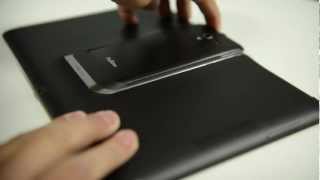
    PadFone 2 - two years in development, seamless one-step docking


    The PadFone concept has been in development for over three years now and the latest release, Padfone 2, has been in the lab for more than two years.

    With PadFone 2, ASUS wanted to further improve the user experience and particularly the process of moving between Pad and Phone.

    ASUS engineers worked tirelessly to reduce the weight of both PadFone 2 and the PadFone 2 Station tablet dock, looking at every part of the product with an eye on reducing weight without sacrificing robustness or quality. The result of all this hard work is that, together, the two are lighter than many 10-inch tablets on the market and the user experience hasn't been compromised in the process.

    One of the key breakthroughs with PadFone 2's design is the new patent-pending docking mechanism. ASUS wanted to simplify the PadFone 2's docking process by reducing the number of steps required to dock or undock the phone.

    PadFone 2 requires just a single-step insertion and removal process that, amazingly, is more secure than the original PadFone docking mechanism, which incorporated a protective hinged door. It's hard to believe that the dock is as secure as it is, but the Phone remains in place when PadFone 2 is used upside down and it'll withstand the knocks and bumps of daily use.

    This was the result of over two years of extensive research and development by ASUS engineers. Many different versions of the mechanism were tested during its two and a half year development, and the result is an incredibly intuitive and refined user experience.

    Docking and undocking is simple and ASUS software engineers also worked to optimize Dynamic Display technology to make the switch between Phone and Pad even more seamless. The result of this work is instantly obvious -- the transition between modes now takes just over one second and your apps are perfectly optimized for both screen sizes.
     

    Official HTC One first look video focuses on design, software and speakers

    HTC One


    It’s out, it’s out, it’s finally out, and it’s… awesome? Fugly? Underwelming hardware-wise? Just downright average? The jury’s still out on the HTC One and we’d love to hear your thoughts, but for now let’s focus on HTC’s marketing efforts.
    The company’s CEO, Peter Chou, has basically blamed all of HTC’s recent misfortune on poor marketing, so today should be the start of a new era, right?
    The buildup has been pretty well-handled by the new marketing department, although the One has definitely been one of the worst kept secrets in recent Android history. We’ve known all there was to it for weeks and yet we’ve been kept on our toes by leak after leak and teaser after teaser.
    For some reason, we just couldn’t look away from all those rumors and if that’s not the definition of great marketing, I don’t know what is.
    And yet one of the first official HTC One marketing moves feels a little forced and disappointing. We’re talking about a first look video uploaded minutes ago by HTC on YouTube. The one-minute clip is lively and entertaining, but doesn’t concentrate on the right things.
    We would have expected HTC to flaunt that mouth-watering Full HD panel with 468 ppi pixel density, the new 4 Ultrapixels camera or the Snapdragon 600 CPU. Instead, the focus is on the new “BoomSound” speakers, the full metal body, the BlinkFeed interface and Zoe. That last feature is a new shooting mode, so you can say it has something to do with the snapper on HTC’s One.
    But it’s not enough. Not enough to scream innovation or show us why someone should pick this bad boy up instead of the Sony Xperia Z. Or the Droid DNA, for that reason.
    Again, the jury’s still out, but HTC has to do a lot more to convince us the One is worth a second look. Do you guys agree? Does the below clip make you want the One or want to forget about it?

    More Huawei Ascend P2 photos leaked

    huawei ascend p2 leaked header
    It’s certainly not a shy device; the Huawei Ascend P2 keeps on cropping up in leaked photographs and reports, despite best efforts to keep the handset under lock and key.
    We saw a couple of images and a benchmark just last week, and now a small selection of snaps has appeared on Gizchina.
    huawei ascend p2 leaked photos
    Ok, so the pictures don’t reveal anything that we hadn’t already suspected or seen before, but if you look closely can clearly see a number 13.0 printed under the camera. So the rumored specs might turn out to be correct after all, at least as far as the camera is concerned. You can also spot the usual micro USB port and 3.5mm headphone jack, but you’d be pretty surprised if they weren’t included somewhere.
    We’ve been pondering whether the rumored specs and seemingly cheap price tag could be true since the handset first popped up on our radar earlier this year, but official information has been tough to come by. Fortunately the Huawei Ascent P2 will be shown off at the Mobile World Congress next week, so it won’t be long until we can finally confirm or discard all these rumors.

    HTC One trade-in program offering $100 or more for your old phone

    htc one
    What could be better news that learning that the HTC One is now official? How about this: HTC is offering $100 or more for customers that trade in their old handsets towards the purchase of the HTC One.
    The promotion is actually pretty straightforward, you pre-register your email and you can then qualify for a Visa prepaid card worth at least $100 or the trade-in value of your phone, whichever is greater. Once you buy your new HTC One you send in your old phone alongside proof of purchase for the HTC One, and they’ll send you the prepaid card.
    htc-one-upgrade
    For those with an older phone sitting in a box or dresser drawer somewhere, this could be the perfect way to get rid of an ancient phone will saving some cash towards your purchase of the HTC One. What do you think, are you planning on picking up the HTC One as soon as it hits your area?

    Ubuntu tablet officially announced for Nexus 7, Nexus 10; not related to HTC for now [video]


    When Canonical put up a countdown timer on its website hinting at the Ubuntu tablet we (and by we I mean the whole tech-reporting community) thought that it had something to do with HTC’s media event today, mainly because the timer suggested that the Ubuntu tablet will be unveiled around the same time with the HTC One, possibly right after it.
    And the Ubuntu tablet was unveiled today, but not during the HTC event, which was only about the HTC One anyway. Just like Samsung a day before – the Galaxy S4 announcement event rumor and confirmation hit a day before the HTC One event – Canonical tried to crash HTC party by stealing some of the spotlight.
    Whether it worked or not, what’s clear is that the Ubuntu tablet is real, and will be available to users later this year.
    Just like the Ubuntu phone which is going to hit the Galaxy Nexus and Nexus 4 in a couple of days, the Ubuntu tablet will be initially available to developers, and only available for Nexus devices. And just like before, we’re going to remind you this is a standalone operating system that will be launched on its own devices, but at the same time the OS will be compatible with existing and future Android hardware, meaning that you’ll have to install it yourself on smartphones and tablets – not that we recommend you that, but it’s up to you to decide what’s best for your gadget.
    Getting back to Ubuntu tablet, you’ll notice that it’s going to feature an overall appearance similar to Ubuntu phone, or Ubuntu in general. We have already told you all there is to know about Ubuntu phone back in January when Canonical unveiled it, so if you’re already familiar with that, then you have a pretty good idea of what to expect from Ubuntu tablet, a touch-based interface that relies on the edges of the display for various actions
    ubuntu-tablet-2
    But Ubuntu tablet will have tablet-specific features of its own mainly because it comes with a larger display to take advantage of. In addition to apps that will scale beautifully – or so one hopes – to the bigger screen, Ubuntu tablet will offer multi-user support, multi-window support and voice recognition features.

    What’s tablety in Ubuntu tablet?

    The multi-user support doesn’t need more introductions. Just like on Jelly Bean tablets, Ubuntu tablets will support multiple users that can log in and personalize their tablet experience.
    The multi-window, dubbed “Side Stage,” feature will even let users run phone-mode apps on the right side of the device, with the left and center side of the tablet used by a different app.
    To increase productivity on the device, voice controls will also be available to Ubuntu tablets, via Ubuntu HUD’s interface.

    Specs, features and availability

    Ubuntu tablet will work on a wide variety of machines, from 6-20 inches in sie, and will require an ARM A15 processor, 2GB of RAM and at least 8GB of storage to work.
    Initially, the Ubuntu Touch Developer Preview will be available on February 21 for the Nexus 7 and Nexus 10, with developers obviously being encourage to try it out.

    How is it to use Google Glass? An engineer gives us a glimpse of the interface

    No, we are not here to report that someone broke those restrictive NDAs that Google required their Glass Forge hackaton attendants to sign.
    But we have a description of the interface of Google’s futuristic head mounted display, offered by an engineer that recently had the opportunity to try out the Google Glass.
    Soumya Mohan, who used the Glass at a tech talk organized at Stanford, took to Quora to describe how the user interface looks and works. According to him, currently the interface is rather crude, only displaying a short “list menu with black background and words written in white”. Among the items in the menu, Mohan recalls  “Click a picture”, “Shoot a video” and “Voice call”.
    The whole menu only included about 4-5 options, and Mohan was able to scroll through it by tilting his head. Other controls available were a small touchpad on the side of the glasses and voice command. (No word yet on that bone conduction tech revealed in the FCC Glass filling.)
    Although the description given by Soumya Mohan doesn’t give us many details that we haven’t already known, it does suggest that at least the first iterations of the device will be crude devices. How crude? Well, remember those clunky old cell phones made by Nokia? The interface might be just as basic.
    Still, all great products have humble origins, and once the Project Glass gathers steam, it will probably develop rapidly. We’re still a long way from the Project Glass: One day… video, but the ground has been broken.

    How to flash Android 4.1.2 Jelly Bean XXELLC for the Galaxy S3 I9300


    banner-galaxy-s3-i9300--jellybean-official-i9300xxellc-121220
    Still waiting for your Jelly Bean update for the Samsung Galaxy S3 GT-I9300? Wait no more because the latest software version XXELLC of Android 4.1.2 Jelly Bean for the Galaxy S3 I9300 has been officially released for the Spain region, which also includes Austria, Belgium, France, Germany, Hungary, Italy, and the United Kingdom.
    This official Android 4.1.2 release reportedly packs all the features you’ve been waiting for in Jelly Bean: Multi-View, Page Buddy, a new Gallery App, Smart Rotation, Paper Artist, and the Group Cast app to name a few.
    Enjoy these new features without having to wait for your updates to arrive over the air. Flash this official firmware package manually to get the Jelly Bean fix you need.
    This guide shows you how to flash Android 4.1.2 Jelly Bean XXELLC for the Galaxy S3 I9300.

    Warning

    • The instructions in this guide are intended for use with the Samsung Galaxy S3, model number GT-I9300. Applying these instructions on another device or model may produce undesired outcomes.
    • The information in this guide is provided for instructional and educational purposes only. There is no guarantee that these instructions will work under your specific and unique circumstances.
    • Use these instructions at your own risk. We shall not hold any responsibility or liability for whatever happens to you or your device arising from your use of the info in this guide.
    • Read and understand the whole guide first before actually performing the instructions.

    Requirements

    • Samsung Galaxy S3 GT-I9300
    • A Windows PC
    • Handset USB drivers installed on the PC. You may install the drivers by installing Samsung Kies.
    • Enable USB debugging on your handset.
    • Disable antivirus, firewall, and other security software. Also disable Samsung Kies and other software that accesses your phone. Such software can interfere with the procedure in this guide.
    • A file extraction tool like WinRAR or 7-Zip installed on your PC.
    • Download the I9300XXELLC firmware (I9300XXELLC_I9300PHEELL3_I9300XXELLA_PHE.zip, 805.8 MB) to your computer.
    • Backup all personal data on your phone to make sure you have a copy of your personal data (e.g., contacts, SMS, MMS, Internet settings, Wi-Fi passwords, and the like) in case the procedure in this guide erases such data.
    • Make sure that your phone’s battery power is at least 50% to avoid interruption due to power loss that may cause damage to your phone.

    Instructions

    1. Extract the I9300XXELLC_I9300PHEELL3_I9300XXELLA_PHE.zip to your computer.
    2. Run the Odin executable file from the extracted ZIP file.
    3. Turn your phone off.
    4. Boot your phone into Download Mode by pressing and holding down the Home, Power, and Volume Down buttons at the same time. Press the Volume key to continue into Download Mode.
    5. Connect your phone to your computer via USB cable.
    6. Once Odin has recognized your phone, click on PDA and locate and select the .tar.md5file you extracted from the ZIP.
      • NOTE: Make sure that the re-partition option is not ticked.
    7. Click Start in Odin to begin flashing.
    8. Once you see the “PASSED” message in Odin, wait for the Samsung logo to appear on your phone’s screen before unplugging your phone from the PC.
    Great work! You just flashed the Android 4.1.2 Jelly Bean software build XXELLC on your Samsung Galaxy S3 GT-I9300. Let us know what you think about the features by leaving a comment.

    How to unroot the Droid Razr HD XT926 and revert to stock

    banner-droid-razr-hd-xt926-restore-stock-unroot
    Sometimes you just can’t help tinkering with your Verizon Motorola Droid Razr HD XT926, especially if you come across new and interesting custom features. However, it also means risking your hundred dollar contract and warranty. Rooting your phone might mean enjoying a taste of freedom but if something goes wrong, you can’t ask for assistance from Verizon since your warranty has been voided. If you’re in this very boat, don’t fret, my friend, because there is now a short and easy way to unroot your phone and revert to stock firmware.
    XDA Developers member Pzyduck shared this method for Droid Razr HD users, allowing them to save their devices by restoring them to stock. This is also handy for people who’ve made a mistake during their adventures of flashing and soft-bricked their phone.
    This guide shows you how to unroot the Droid Razr HD XT926 and revert to stock.

    Warning

    • The instructions in this guide are intended for use with the Verizon Motorola Droid Razr HD, model number XT926. Applying these instructions on another device or model may produce undesired outcomes.
    • The information in this guide is provided for instructional and educational purposes only. There is no guarantee that these instructions will work under your specific and unique circumstances.
    • Use these instructions at your own risk. We shall not hold any responsibility or liability for whatever happens to you or your device arising from your use of the info in this guide.
    • Read and understand the whole guide first before actually performing the instructions.

    Requirements

    • A rooted Verizon Motorola Droid Razr HD XT926
    • Enable USB debugging on your phone. Go to Settings > Developer options and tick the USB debugging option.
    • Download the following files:
    • Make sure your device’s battery still has at least 70% power. You don’t want the device to shut down in the middle of the procedure.
    • Backup all personal data on your phone to make sure you have a copy of your personal data (e.g., contacts, SMS, MMS, Internet settings, Wi-Fi passwords, and the like) in case the procedure in this guide erases such data.

    Instructions

    1. On your computer, extract the firmware package.
    2. Open the extracted folder and you will find a VZW_XT926_4.0.4-7.7.1Q-144_VQW_S3-34-25_CFC.xml file.
    3. Open that file with Notepad and delete all the lines with the word “getvar’ then Save the file.
    4. Open the RSD Lite program and press the “…” button. Browse and select the XML file that you edited with Notepad.
    5. Boot your phone into AP Fastboot Mode, as follows: Turn off your phone and hold down the Volume Up, Volume Down, and Power buttons together to enter Boot Selection Mode. Scroll down and select AP Fastboot.
    6. Connect your phone to your computer via a USB cable. Your phone should be recognized as XT926.
    7. Press Start in RSD Lite to start the flashing. It should take about 15 to 20 minutes.
    8. Your phone should reboot into stock firmware.
    Nicely done! You’ve just restored your Verizon Motorola Droid Razr HD XT926 to stock and unrooted it. Share some of your thoughts in the comments. Enjoy!

    How to root the Photon Q 4G LTE XT897 and flash ClockworkMod Recovery

    banner-photon-q-4g-lte-xt897-cwm-root
    Custom ROMs are the way to go if you want to explore the custom features available. Before you can do that, you have to gain root access and install custom recovery on your phone for easy flashing. XDA Developers member shabbypenguin was kind enough to share with us  how to root the Motorola Photon Q 4G LTE XT987 and how to install ClockworkMod Recovery on it afterwards.
    For more info about rooting, you can consult our beginner’s guide to rooting your Android device. Meanwhile, ClockworkMod Recovery is a custom recovery that allows you to easily flash custom ROMs and other customizations via ZIP files. The tool also lets you perform other functions such as wiping partitions, easily backing up and restoring data, and more. It’s a faster and easier way to install customizations on your phone compared to the Odin method.
    This guide shows you how to root the Photon Q 4G LTE XT897 and flash ClockworkMod Recovery.

    Warning

    • The instructions in this guide are intended for use with the Motorola Photon Q 4G LTE, model number XT897. Applying these instructions on another device or model may produce undesired outcomes.
    • The information in this guide is provided for instructional and educational purposes only. There is no guarantee that these instructions will work under your specific and unique circumstances.
    • Use these instructions at your own risk. We shall not hold any responsibility or liability for whatever happens to you or your device arising from your use of the info in this guide.
    • Read and understand the whole guide first before actually performing the instructions.

    Requirements

    Instructions

    1. Copy cwmrecovery.img into the same folder where fastboot.exe is located.
    2. Copy the SuperSU ZIP package to your phone’s SD card.
    3. Turn off your phone.
    4. Enter Bootloader Mode by holding the Volume Down, Volume Up and Power buttons at the same time. Select AP fastboot.
    5. Connect your phone to your PC via a USB cable.
    6. Open a command prompt from the Android SDK platform-tools folder with Windows explorer.
      • You can do this by holding down Shift on your keyboard, right-clicking with your mouse, and selecting Open command window here.
    7. Type in the following commands and press Enter on your keyboard after each command.
      • Type fastboot devices to check if your phone has been recognized by your PC. If successful, it should respond with your phone’s serial number.
      • Type fastboot flash recovery cwmrecovery.img to install ClockworkMod Recovery.
    8. Enter Bootloader Mode again then select Recovery to boot into ClockworkMod Recovery.
    9. In ClockworkMod Recovery, do the following:
      1. Select Install ZIP from SD card > Choose ZIP from SD card > Select the SuperSU file.
      2. Once installed, select Go Back and select Reboot System Now.
    Congratulations! You have rooted your Motorola Photon Q 4G LTE XT897 and installed ClockworkMod Recovery. Enjoy flashing custom ROMs, mods, kernels, and more on your device.

    How to flash TWRP Recovery for the Photon Q 4G LTE XT897


    banner-photon-q-4g-lte-xt897-twrp-recovery

    There are a lot of things you can do with Android devices, thanks to the variety of customizations that developers are cooking up and the apps emerging on the Google Play Store. However, a custom recovery such as TWRP Recovery is a must-have tool if you want to enjoy all of these customizations on your phone. With this tool, you can enjoy hassle free and quick installations.
    XDA Developer arrrghhh managed to put together TWRP Recovery for the Motorola Photon Q 4G LTE XT897. The essential recovery features are up and running, though the port is still not a hundred percent perfect since the USB Mass Storage is not working, the clock is off, and the physical keyboard can’t be used to type while in recovery mode. Still, it’s already workable and can be used to install customizations on your phone. If you are thinking of giving it a try, just follow the our step-by-step tutorial below.
    This guide shows you how to flash TWRP Recovery for the Photon Q 4G LTE XT897.

    Warning

    • The instructions in this guide are intended for use with the Motorola Photon Q 4G LTE, model number XT897. Applying these instructions on another device or model may produce undesired outcomes.
    • The information in this guide is provided for instructional and educational purposes only. There is no guarantee that these instructions will work under your specific and unique circumstances.
    • Use these instructions at your own risk. We shall not hold any responsibility or liability for whatever happens to you or your device arising from your use of the info in this guide.
    • Read and understand the whole guide first before actually performing the instructions.

    Requirements

    Instructions

    Installing via GooManager

    1. Install GooManager on your Photon Q 4G LTE.
    2. Open GooManager on your phone.
    3. Go to Menu (tap the icon beside the Search button) and select Install OpenRecoveryScript from the list.
    4. Confirm Recovery Install by selecting Yes.
    5. Grant root access to the app, if prompted.
    6. Wait until the installation is done.

    Installing via Fastboot

    1. Save the TWRP Recovery image to your computer’s C:\ drive.
    2. Connect your phone to your computer via a USB cable.
    3. Open a command prompt on your computer. You can do this by pressing the Windows button and pressing R to launch the Run dialog. Type cmd in the dialog box.
    4. Change the working directory of the command window to the location where you saved the TWRP Recovery image. In the command prompt, enter the location of the file in this format “cd c:\location of file”
      • For example, cd c:\android.
    5. Put your phone in Fastboot Mode by entering adb reboot bootloader at the command prompt.
    6. Enter fastboot flash recovery openrecovery-twrp-2.4.0.0-asanti_c.img at the command prompt to install TWRP Recovery.
    7. Once installed, unplug your phone and reboot.
    8. To boot into TWRP Recovery, do the following:
      1. Turn off your phone.
      2. Hold the Volume Up and Power buttons together then release the Power button.
      3. When the display turns on release the Volume Up button. You should now be in TWRP Recovery.
    Hooray! You have just installed TWRP Recovery on the Motorola Photon Q 4G LTE XT897. You can now install custom ROMs and other goodies on your phone.

    Huawei Ascend Mate goes up for pre-order in China, $575 gets you a 6.1-inch phablet

    huawei-ascend-mate-1

    he Huawei Ascend Mate was made official last month at CES, but not without leaving a lingering question of whether bigger is really better. Regardless of how you feel about holding a huge phone in your hand(s), Huawei is looking to shake up the Galaxy Note establishment with its 6.1-inch phablet offering.
    If you find yourself strangely attracted to the Ascend Mate, you’ve probably heard that it’ll be launched in China this month, while a global release can be expected in the following month. Now, we have some unofficial pricing information for the phone.
    One online retailer in China has begun taking pre-order for the Ascend Mate, where it’s offered for $575. Those brazen enough to consider placing an order will be glad to know that the website ships worldwide. Before your gadget lust gets the better of you, however, we suggest you wait for more confirmation from Huawei on when the device will actually hit stores and at what price point.
    In the meantime, you can always check out our hands-on video of the Ascend Mate again.

    Galaxy Fonblet 5.8, Pocket 2, Star, Young, Frame and GT-B9150 spotted in benchmarks

    samsung
    It’s not only Galaxy S4 leaks that we get to look at on a pretty regular basis these days, but we also see plenty of unconfirmed details about a variety of other Android-running Galaxy-branded devices that are going to be released by Samsung at some point in the coming months.
    After recently checking out quite a variety of new Samsung products in benchmark results, we now have six more unannounced devices to show you, as spotted – you probably guessed it – in GLBenchmark results.
    Five of them are apparently part of the Galaxy family: the Galaxy Fonblet 5.8, the Galaxy Pocket 2, the Galaxy Star, the Galaxy Young and the Galaxy Frame, while the sixth one doesn’t have a customer-friendly product name, the GT-B9150.
    The Galaxy Fonblet 5.8 (model number GT-I9150 / GT-I9152) is a device we’ve heard of before which is apparently going to feature a display with a 960 x 540 resolution (qHD) 1.2GHz Broadcom BCM28155 CPU, VideoCore IV GPU and Android 4.1.2 Jelly Bean.
    The Galaxy Pocket 2 (model number GT-S5310 / GT-S5312) appears to be a low-end Jelly Bean handset ready to offer you a 320 x 240 (VGA) display, a 850MHz Broadcom CPU, VideoCore IV GPU and Android 4.1.2.
    Like the previous one, the Galaxy Star (model number GT-S5282) is also an low-end handset, sporting a 320 x 240 (VGA) display, Spreadtrum CPU, Mali-300 GPU and Android 4.1.2 Jelly Bean.
    Moving on to mid-range devices we have the Galaxy Young (model number GT-S6310 / GT-S6312) that will feature a 480 x 320 (HVGA) display, 1GHz Qualcomm 7X27 processor, Adreno 200 graphics and Android 4.1.2 Jelly Bean.
    The Galaxy Frame (model number GT-S6810 / GT-S6810P) comes with Young-like characteristics: 480 x 320 (HVGA) display, 1GHz Broadcom CPU, NFC (the P variant only) and Android 4.1.2 Jelly Bean.
    Finally, the GT-B9150, the only unnamed handset of the bunch, appears to be a high-end device that will feature a 1920 x 1080 display (Full HD), 1.7GHz dual-core Exynos 5250 processor, quad-core Mali-T604 GPU, and a second-generation Jelly Bean flavor, Android 4.2.1.
    We have seen previous rumors detailing this particular product back in October 2012, and at the time we told you that the handset could come with a full QWERTY keyboard given the model number, but Sam Mobile speculates that the handset could be a high-end tablet as well.
    See anything you like in this collection of yet-to-be-released handsets?

    Huawei Ascend P2 Mini reportedly confirmed for MWC 2013 announcement


    Huawei Ascend P2
    We have already shown you the Huawei Ascend P2, a really skinny D2, and now we have a new report that says a Mini version of the handset is set to be unveiled in the coming weeks.
    As most of you know already, the Mobile World Congress (MWC) takes place every year in February in Barcelona, Spain, and it looks like that’s where the Ascend P2 Mini will be unveiled right alongside its bigger brother.
    While not all specs and features are known at this time, the Ascend P2 Mini is said to feature a 4-inch display with 720p HD resolution, 1GB of RAM, 8-megapixel camera and Android 4.1 Jelly Bean.
    Comparatively, the Ascend P2 will sport a bigger 4.7-inch display with 1080p Full HD resolution, a 1.8GHz K3V2 quad-core CPU, 2GB of RAM, 13-megapixel camera, a 2200mAh battery and Android 4.1 Jelly Bean under the hood.
    Anyone looking forward to these Ascend P2 models? Which one would you get?